Arduino Project 7- Button tactile switch and LED
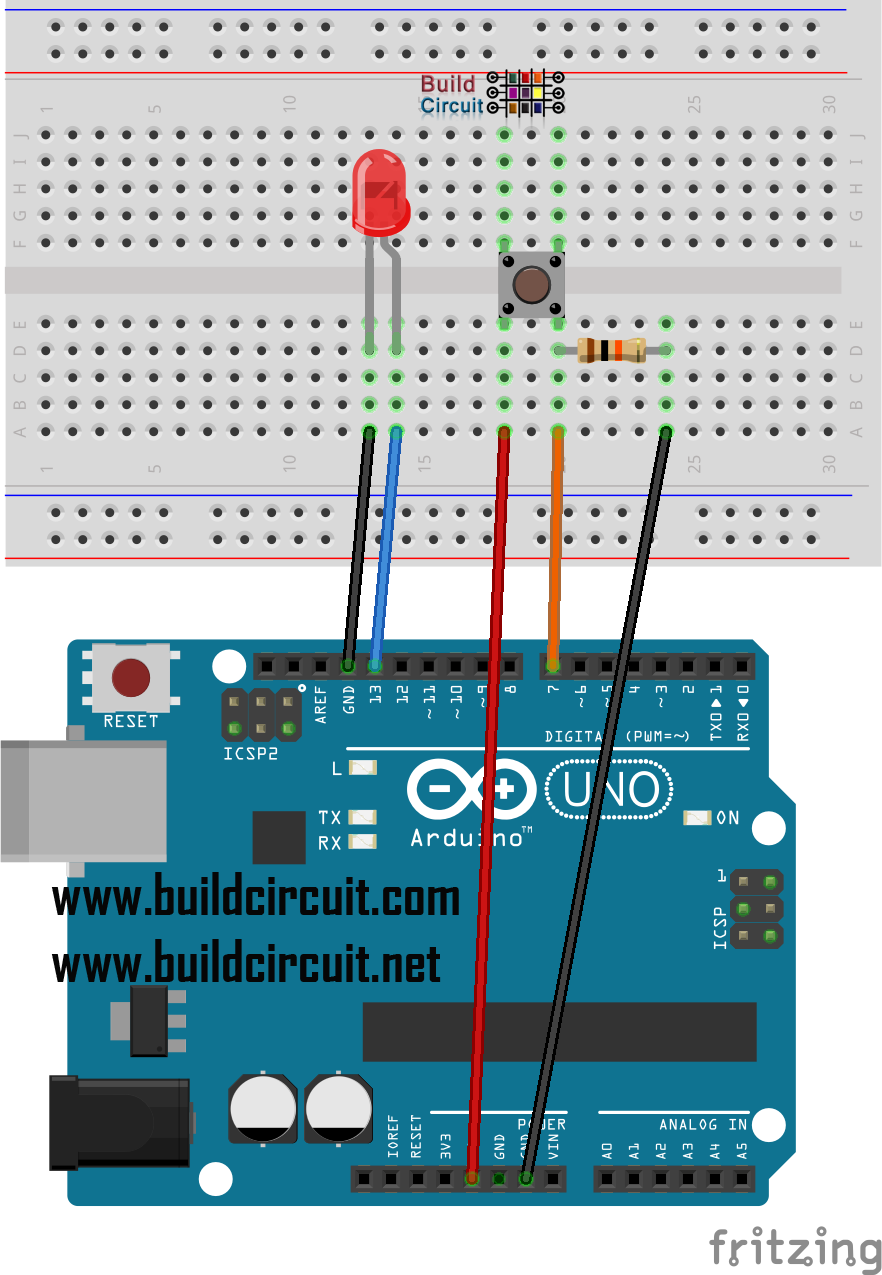
In this tutorial, we will use the digitalRead function and learn how to read a digital pin.
In our case, the digital sensor that will be read will be a common button/reset tactile switch that when pressed will turn on the LED.
Components required:
| Name | Quantity | Component |
|---|---|---|
| U1 | 1 | Arduino Uno R3 |
| D1 | 1 | Green LED |
| R1 | 1 | 220 Ω Resistor |
| S1 | 1 | Pushbutton |
| R2 | 1 | 10 kΩ Resistor |
🛠️ Dive into our collection of DIY Kits, 🔊 Audio Amplifiers, Digital Scoreboards, FM transmitters, and more!
🎶 Explore endless possibilities at our new store.