SensorGraph using android, amarino and arduino ‹ BUILD CIRCUIT

SensorGraph using android, amarino and arduino


This tutorial is for novices who have never made any Android application or worked with amarino.

We need following components/equipments for this experiment:
a. Android Smart Phone- I am using ZTE Blade. See the operating system specifications on the given link. Quite cheap and good looking.

b. Arduino Duemilanova ATmega 328

c. Eclipse IDE for Java EE Developers

d. Androidsdk

e. Amarino Toolkit

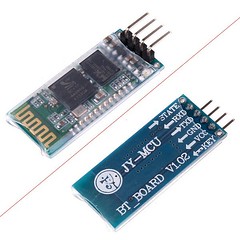
f. Bluetooth Modem – Bluesmirf Gold

g. Potentiometer,  Temperature Sensor, Light dependent resistor any other kinds of variable resistor- You can read more about using variable resistors and temperature sensors at http://www.ldrengineering.org/how-to-use-variable-resistor/

Step 1 Install Amarino

Go to http://www.amarino-toolkit.net/ and download the following applications on your mobile phone

a. Amarino – Android Application- to be installed on phone.

b. Amarino Plug-in Bundle- to be installed on phone.

c. Amarino Library- To be kept in computer- needed to installing the application

Step 2 Download Meet Arduino Library

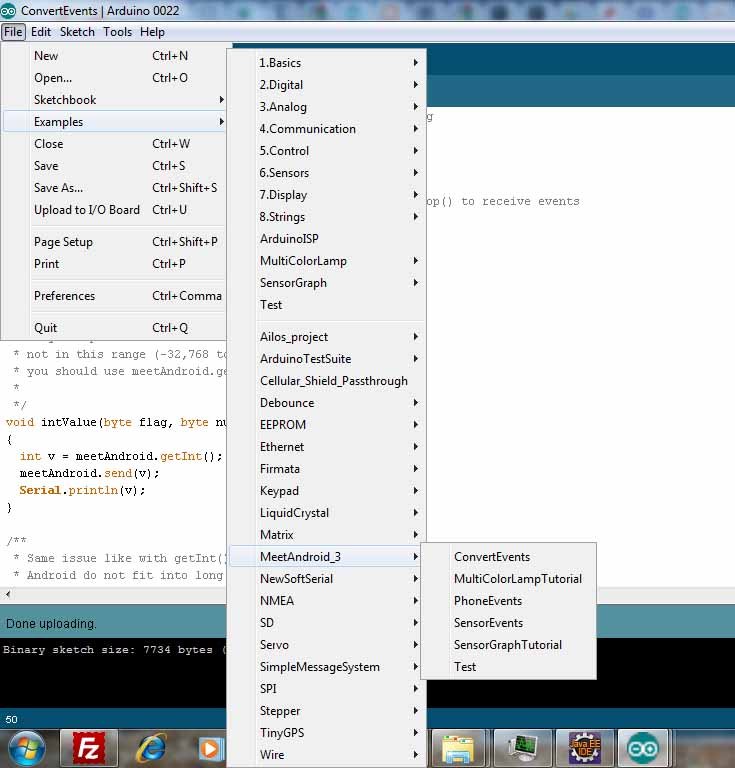
Download the MeetAndroid Library and place it into the libraries Folder Arduino.

After placing the folder into the libraries folder, you should be able to access all the amarino files through the arduino programming environment.

You can see the picture below(Click on the image to enlarge it):
Step 3 Set up bluesmirf gold adapter

Connect the bluesmirf gold Bluetooth adapter in the following way:

CST–1 to RTS–0
VCC — 3.3V
GND — GND
TX — RX (digital pin 0 of arduino)
RX — TX (digital pin 1 of arduino)
NOTE: Your BlueSmirf Bluetooth Module should have 115200 baud rate. Otherwise, it won’t work. Here’s a tutorial for checking the actual baud rate of your module and changing it if it has something else than 115200.
http://www.circuit-blog.com/how-to-change-baud-rate-of-bluetooth-modem-bluesmirf-gold-using-arduino-terminal/

Step 4 Test the communication between Blue smirf module and Arduino

Click herehttp://www.amarino-toolkit.net/index.php/getting-started.html
While uploading the arduino code on Arduino chip, set the Serial Monitor Baud rate to 115200(on arduino code).

Step 5 Set up Eclipse

It is the most complicated part of this experiment.
You can get a detailed tutorial from http://developer.android.com/sdk/eclipse-adt.html#installing
The basic idea is to Install the Eclipse first(follow the system requirements), then install the android SDK, then install ADT plugin for Eclipse IDE. I strongly recommend you to follow the instructions seriously.

Step 6 Download the SensorGraph folder

Download the SensorGraph example from http://www.amarino-toolkit.net/index.php/download.html and place it in a folder(anywhere).

Step 7 Work on SensorGraph

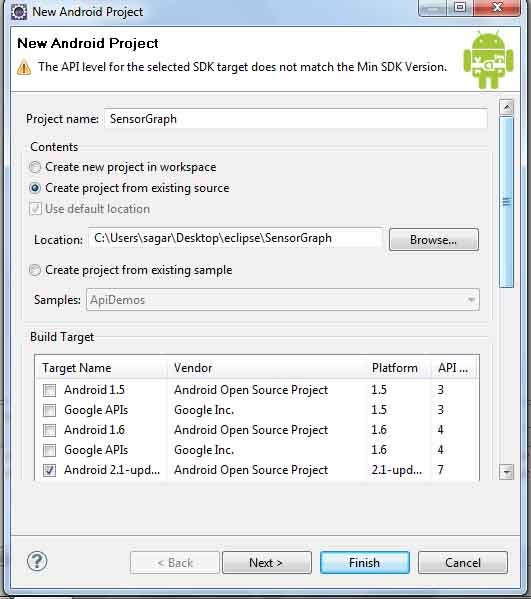
Go to Eclipse and right click your project panel, and select new android project. In the picture below, you can see that I have selected Android 2.1 because my ZTE Blade phone has Android 2.1 API 7.

NOTE: you need to already have Androidsdk plugin installed.

- Select ‘create from existing source’.
- Use the browse button to find your Sensor Graph folder that you just downloaded.
- Select android 2.1 OR any other versions as the targeted device from the list. It depends upon the phone you use.
Click Finish.

*You might get yellow exclamation warnings next to your sensor graph project, it doesnot affect your project, so, just ignore it.

*If you have a red “X” you might need to make you have your “AmarinoLibrary_v0_55.jar ” file is included. Download it from http://www.amarino-toolkit.net/index.php/download.html

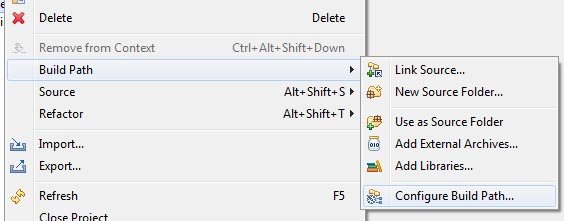
*To include the file right click on your SensorGraph folder and click build path > configure build path > libraries > add external jar > and browse for the AmarinoLibrary_v0_55.jar file. > ok

**Very very Important- Open the SensorGraph.java file in Eclipse and place your bluesmirf device number inside this line of code ( private static final String DEVICE_ADDRESS = “YOUR BLUE TOOTH DEVICE NUMBER”;)

** Changing AndroidManifest.xml file. Go to Application and set Debuggable as ‘True’.

Phone side (HOW TO INSTALL THE APPLICATION)

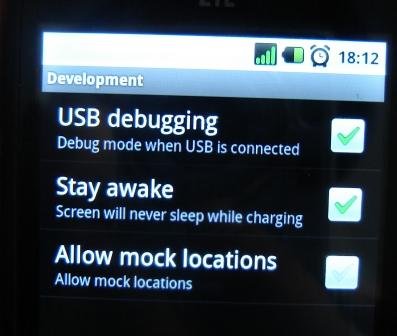
Your phone should already be connected via usb to your computer, In your phone settings, developer debug mode, and install from unknown sources checked.

In my phone, it was in settings>applications>USB debugging.
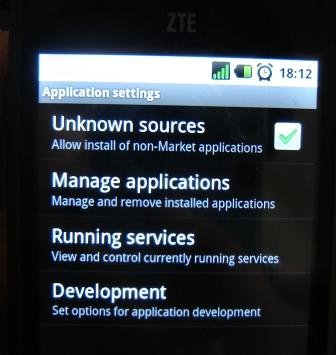
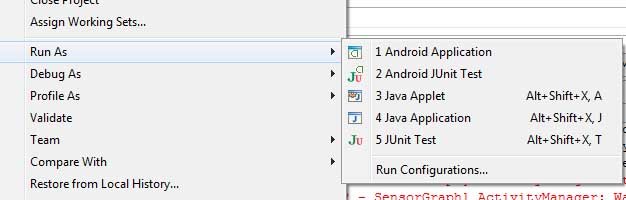
 Next, right click on your SensorGraph folder and > Run as Android Application.

When the dialog box of the AVD manager launches select your phone as the targeted device. It will be the one that does not say emulator and probably have some device number to it.
Launch
This will install the SensorGraph app to your phone and run it.

—————————————-

WARNING: If your application is not installed on phone, then there is a possibility that your phone’s device driver is not installed on computer. Go to Device manager and install the driver for your phone. If you have internet connection, it searches itself for the driver. You can get more information from here: http://developer.android.com/guide/developing/device.html

——————————————-

Arduino Side

You can get arduino code file on one of the folders of Sensor Graph. Set the baud rate to 115200 and write it to your chip.

While uploading the sketch to arduino, remove the RX and TX connections of bluetooth module.

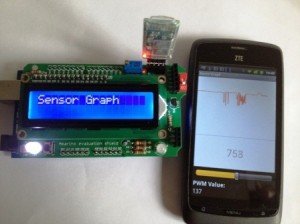
Then make a simple circuit using LDR, variable resistor or thermistor. In the picture below, I have used LDR(light dependent resistor).
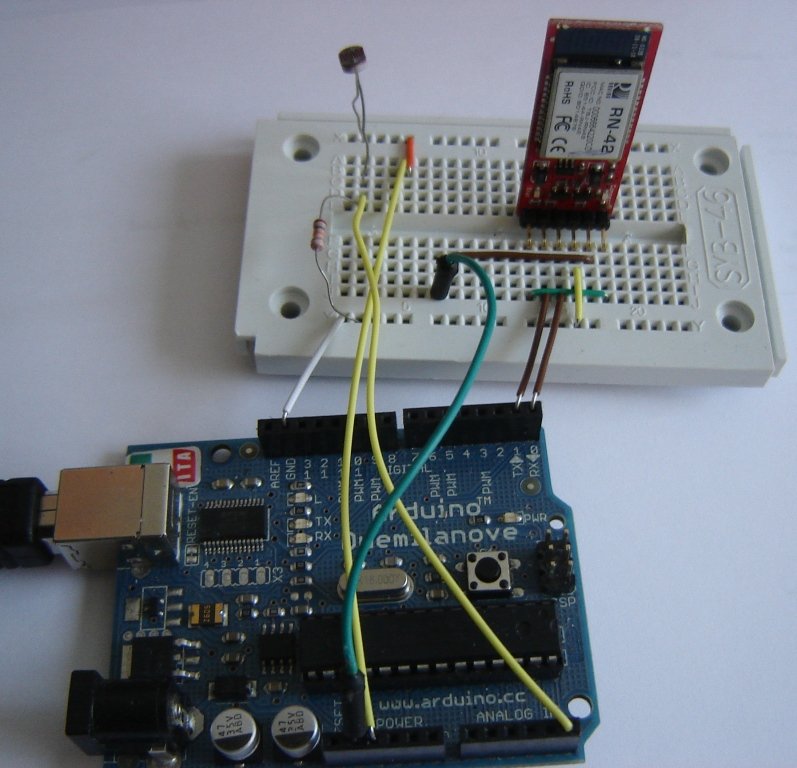
If you have never done this kind of experiment before, I recommend you to do this experiment first: http://arduino.cc/en/Tutorial/AnalogReadSerial

-After uploading the sketch and fixing the circuit, connect the bluetooth module. Connection of bluetooth module has been described earlier in this tutorial.

If you follow the instructions carefully, your application will work. Please write me if you have any problem. You can watch the output on the video.

Check your experiment

1. Did you edit the MAC address?

2. Did you set ‘Debuggable’ as True in AndroidManifest.xml ?

3. Did you set the baud rate of BlueSmirf Module to 115200 and set the same baud rate in arduino sketch?

http://www.circuit-blog.com/how-to-change-baud-rate-of-bluetooth-modem-bluesmirf-gold-using-arduino-terminal/

4. Did you connect the bluetooth module in right way?

CST–1 to RTS–0
VCC — 3.3V
GND — GND
TX — RX (digital pin 0 of arduino)
RX — TX (digital pin 1 of arduino)
READ ABOUT SENSOR GRAPH WITH CUSTOM BLUETOOTH ID


22 Comments for: SensorGraph using android, amarino and arduino

Simon

Hello!

I connnect my Galaxy Nexus (4.0.4.) to my Mac and i run the SensorGraph Peoject “as android project”. The app is send to my phone – but i can’ open it, it always crashes. Any ideas?

I uses API level 15 (4.0.3.).

Michael

Hey there,
when i insert the Amarino_v0_55.jar i get the errors:

1.The method onProgressChanged(SeekBar, int, boolean)
of type MultiColorLamp must override a superclass
method
2.The method onStartTrackingTouch(SeekBar) of type
MultiColorLamp must override a superclass method
3.The method onStopTrackingTouch(SeekBar) of type
MultiColorLamp must override a superclass method

need some help please!!!

ADs

Hi,
I am using a htc desire -android 2.2(froyo) device .i want to get data from a sensor to the device is it possible by the way you just showed.My concern is (Froyo comptiblity with arduino and amarino).Waiting for a reply

Eddie

I follow the instructions to do java program.But run into a problem.
It appears 3 errors and one warnning.
error messages
1.The method onProgressChanged(SeekBar, int, boolean)
of type MultiColorLamp must override a superclass
method
2.The method onStartTrackingTouch(SeekBar) of type
MultiColorLamp must override a superclass method
3.The method onStopTrackingTouch(SeekBar) of type
MultiColorLamp must override a superclass method
Warnnings
1.Attribute minSdkVersion (3) is lower than the
project target API level (7)
What do they mean? How am I suppose to do to correct them?
Thanks

Helen

Hi! I’m beginner in this, but I’m very interesed in this use of arduino, I have one question which should not be difficult for you. I wonder, is there a different type of communication between arduino and phone instead of bluetooth? I actualy want to make some kind of control with this but condition is that it is applied in long distance between these two. So far I’m only aware of bluetooth. I know it could be done with arduino itself using Ethernet shield, but I want android app to use instead. Thank you! Hope of getting your answer soon!

    buildcircuit

    Hello, these days I am focusing on Bluetooth based projects only. I already have several bluetooth related projects on pipeline to publish on buildcircuit.com. Currently, I have not made any Android application for controlling via 3G or Wifi, however, I recommend you to check http://www.amarino-toolkit.net and join their group(http://groups.google.com/group/amarino-toolkit?pli=1). They usually discuss about such applications, may be you will get some ideas from there.
    You can also ask this website: http://www.domotichome.net/

    However, sooner or later I will publish such articles also, but you will have to wait for that. I am sorry for today. If I find such source codes on other sites, I will definitely inform you.

      Helen

      Thank you very much, you are very polite, I actually am just starting with android, so I find your work very usefull and is very well writen, hope I can manage with this project I’m starting, be very thankfull f you keep me informed!

Alan

Hi, I understand that bluetooth has a various of profiles, I have one bluetooth module featured with serial port profile(SPP), do you have any idea if it can pair with computer? is there any settings that I should do?
Thanks.

    buildcircuit

    You can pair with your computer and send commands from computer as you send from smart phone. You have right bluetooth module. It should have SPP.

Harihar

Whenever I open sensorgraph application , I get an eroe message, “Amarino 2.0 force close”. please let me know the solution

Joe

Is there a more affordable bluetooth modem? Couldn’t you have used a bluetooth sheild like this one? http://iteadstudio.com/store/index.php?main_page=product_info&cPath=18&products_id=307

I’m just getting into all this so it may be a dumb question. But $17 is a lot better for me than $64 so if it would work that would be my preference.

    linagee

    $17 is way too expensive. $11 with shipping included by getting one from ebay. ($7 if you don’t need the carrier board.) It even included a cable.

Dan_trejo

Thank you, now I can play with my android phone and my old arduino projects

Daniel

I just tried and worked great, following carefully all u mentioned.

Just want to know, the value show, what is it? milivolts?

Alex

Same comment as Mat, Sensorgraph crashes Amarino 2.0, forces close. Here’s the fatal exception from Eclipse:
09-06 13:44:05.559: ERROR/AndroidRuntime(23809): java.lang.IllegalArgumentException: 00:07:80:99:57:f3 is not a valid Bluetooth address

There’s a series of ats below it, including:
09-06 13:43:23.801: ERROR/AndroidRuntime(23779): at android.bluetooth.BluetoothDevice.(BluetoothDevice.java:371)
09-06 13:43:23.801: ERROR/AndroidRuntime(23779): at android.bluetooth.BluetoothAdapter.getRemoteDevice(BluetoothAdapter.java:336)
09-06 13:43:23.801: ERROR/AndroidRuntime(23779): at it.gerdavax.easybluetooth.LocalDevice2Impl.getRemoteForAddr(LocalDevice2Impl.java:88)

But if I run the serial monitor in Amarino, it will read the data from the ArduinoBT just fine.

Daniel

Mine says Conversion to Dalvik format failed with one Error.. what error I cant figure out

Mat

When I create this project and run it on my Android device, as soon as it runs it Force Closes!

Do you know why?

My android version is 2.3.3

Thanks.

panos

how can i use two bluetooth devices for this example?
i successfully run it with each one bt device but when i try to connect two,again only one is connected and a message for pairing of the second device is arised.when i pair it, still a message like ‘cannot establish connection’ is shown.

in the code i just add
private static final String DEVICE_ADDRESS1 = “…”;
private static final String DEVICE_ADDRESS2 = “…”;

Amarino.connect(this, DEVICE_ADDRESS1);
Amarino.connect(this, DEVICE_ADDRESS2);

Amarino.disconnect(this, DEVICE_ADDRESS1);
Amarino.disconnect(this, DEVICE_ADDRESS2);

any ideas??

thanx

Illuminator91

I can use Arduino uno for this project right?

    CIRCUIT-BLOG.COM

    yes, you can also use Arduino UNO for this project.

Multi color Lamp using Amarino and Arduino « circuit-blog.com and ldrengineering.com

[...] How to Make SensorGraph // // We need following components/equipments for this experiment: [...]


Leave a comment


UserOnline

© BUILD CIRCUIT 2012 - BuildCircuit.com is owned and operated by Sagar Sapkota. www.buildcircuit.org is the business site of BuildCircuit.